Track Library Books Issued / Due
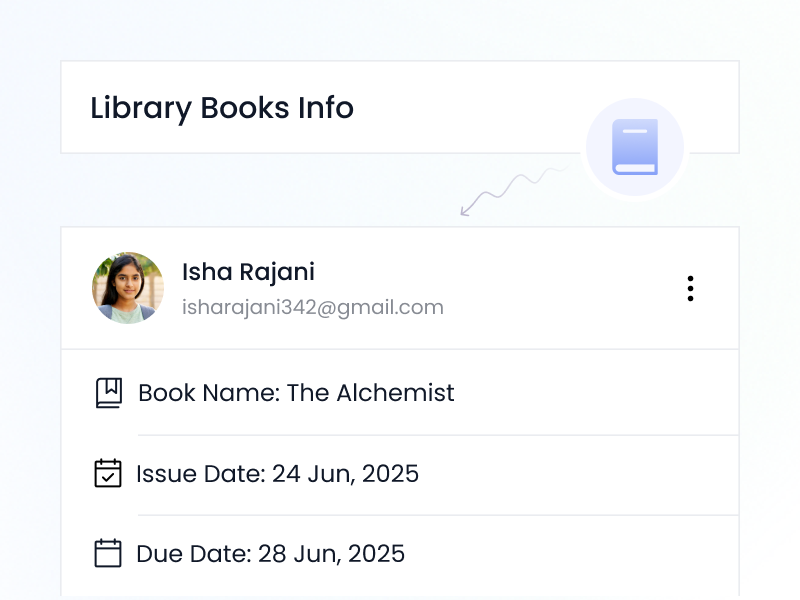
Students can see which books they’ve borrowed, due dates, and return status — right from their portal.





No More “Did I Return That?” Confusion
Students can easily keep track of their library books — with issue dates, due dates, and titles all listed in one place. It helps build reading habits and teaches accountability — with gentle reminders instead of penalties.
📚 School libraries should feel organized — not mysterious.
With iSchoolCloud, students know exactly:
✅ Which books are in their name,
📅 What’s due, and
🔁 What’s been returned.
🚫 No long queues at the counter.
⏰ No forgotten return dates.
💸 No surprise late fines.
📖 It’s a small habit with big impact —
📝 Tracking what you read,
📤 Returning on time, and
🤝 Respecting shared resources.
Whether you’re an active reader 📘 or just borrowing for assignments 📄, this feature keeps things:
🧹 Tidy,
⏳ Timely, and
😌 Low-stress.
And most importantly —
🧑🎓 It helps build real responsibility.
Stay updated without asking the librarian
The school librarian or system admin updates entries via the library module.
If your school allows it, you’ll see a “Renew” button before the due date.
Overdue status is flagged — fines or action depend on your school’s policy.
The system shows the due date clearly and can send alerts in advance.
Yes — your full borrowing history is available in your dashboard.
Not currently — it’s a tracker, not a suggestion engine.
If your school library manages eBooks, those can be tracked too.
Only if the school library allows reservation via iSchoolCloud.
Contact your school librarian — they can correct any entry from their side.
If your school enables it, yes — parents can see what their child borrowed.
 4.9 5000 Total Reviews
Join Our Inner Circle for Special Perks

 Trusted by 50000 educational pioneers