Digital Transformation for Traditional Schools: A Step-by-Step Guide
 August 30, 2025

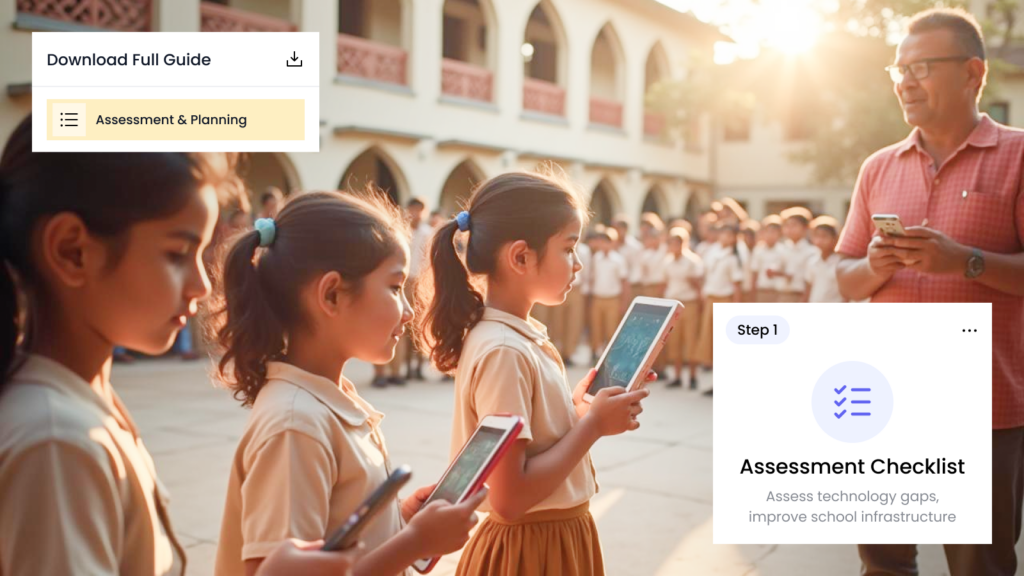
Table of Contents
Transform your traditional school into a digital powerhouse without losing its heart and soul. This complete step-by-step guide shows exactly how a 150-year-old Rajkot school modernized operations, saved 30 minutes daily per teacher, and improved parent satisfaction—all while maintaining their warm, community-focused culture. Discover the proven 7-step process that Gujarat schools use to embrace technology strategically.
Three months ago, I visited a 150-year-old school in Rajkot that had just completed their digital makeover. The principal, Mrs. Patel, walked me through their modern office where teachers were updating attendance on tablets while parents received real-time notifications on their phones.
“Six months ago, we were drowning in paper,” she told me, gesturing toward a single file cabinet that now held only legal documents. “Today, our teachers spend 30 minutes less daily on administrative work, and parents actually thank us for keeping them informed.”
What struck me wasn’t the technology – it was how natural everything felt. Students still felt like students. Teachers still focused on teaching. Parents still cared about their children’s progress. The school still felt like the same warm, community-focused institution it had always been.
The only difference? Everything worked better.
If you’re running a traditional school in Gujarat and wondering whether digital management could work for your institution, Mrs. Patel’s story proves it’s not only possible – it’s surprisingly straightforward when done right.
Why Traditional Schools Actually Have an Advantage
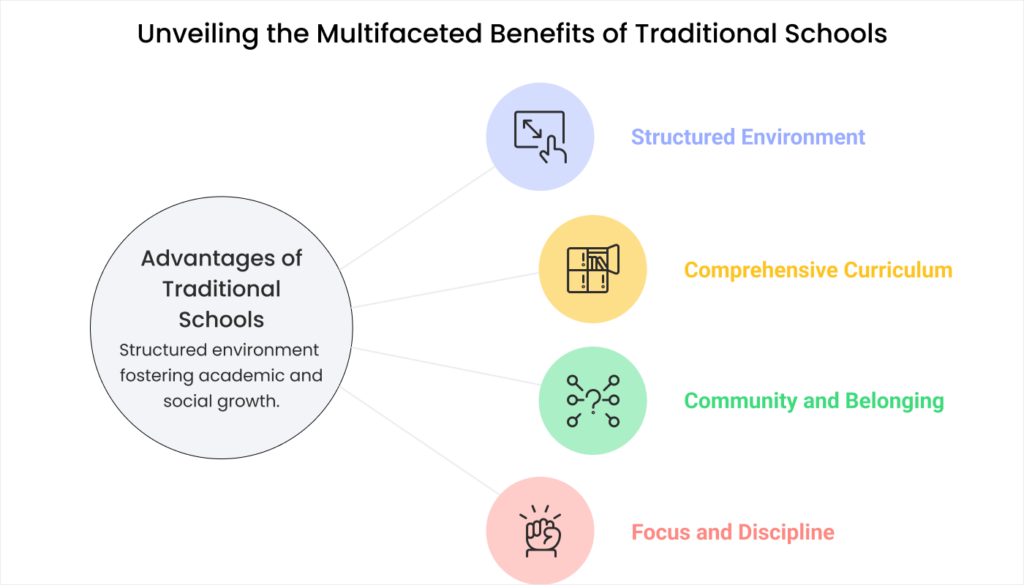
Before we dive into the how-to steps, let’s address the elephant in the room: many traditional school owners worry that digital systems will somehow make their school less personal or community-focused.
The truth is exactly the opposite.
Your Foundation is Already Strong
Traditional schools in Rajkot and across Gujarat have something that newer institutions spend years trying to build: established relationships with families, proven educational approaches, and deep community roots.
Digital tools don’t replace these advantages – they amplify them.
When your office staff spends less time hunting for files, they have more time for the personal interactions that parents value. When teachers don’t need to fill out multiple attendance registers, they can focus on the individual attention that makes your school special.
Parents Trust Your Judgment
Families choose traditional schools because they trust your educational philosophy. When you introduce digital improvements, parents see it as your school getting even better, not changing into something different.
A school in Ahmedabad discovered this when worried parents initially questioned their move to digital attendance. Within two weeks, the same parents were praising the school for sending daily attendance updates that helped them stay connected to their child’s school routine.
You Control the Pace
Unlike new schools that might rush into complex technology to appear modern, established schools can implement digital tools thoughtfully and gradually. You already have enrolled students and parent trust – there’s no pressure to impress anyone with flashy technology.
The Complete Step-by-Step Implementation Guide

Here’s the exact process that successful Gujarat schools use to transition from traditional paper-based management to digital systems without disrupting their educational mission.
Step 1: Assessment and Planning (Weeks 1-2)
Map Your Current Processes
Start by documenting exactly how your school operates today. Spend one week observing and recording:
- Morning routines: How do teachers mark attendance? How long does it take? Where do the records go?
- Fee collection: What steps are involved from payment to receipt? Who handles queries? How are records maintained?
- Parent communication: How do you currently share information? What works well? What causes confusion?
- Record keeping: Where are student files stored? How do you find information quickly? What happens during busy periods?
Don’t judge or criticize current methods – just document them honestly. You’ll need this baseline to measure improvement later.
Identify Your Biggest Pain Points
Ask your staff these specific questions:
“What takes the longest time in your daily routine that doesn’t directly help students?”
“What do parents ask about most frequently that we should be able to answer instantly?”
“What mistakes happen regularly that we could prevent with better systems?”
“What makes you stay late or work overtime that shouldn’t be necessary?”
Their answers will guide your implementation priorities.
Set Realistic Goals
Don’t aim for perfection immediately. Instead, set specific, measurable goals like:
- Reduce daily attendance processing time by 50%
- Answer parent fee queries instantly instead of “we’ll check and call back”
- Send attendance updates to parents same day instead of weekly summaries
- Eliminate overtime during report card preparation
Step 2: Team Preparation (Weeks 2-3)
Address Concerns Honestly
Your staff will have worries about digital systems. Common concerns in Gujarat schools include:
“What if I can’t learn the new system?”
Response: “We’ll train everyone thoroughly, and you’ll have support whenever you need it. The systems we’re considering are designed to be simpler than our current paper processes.”
“Will this mean layoffs or job changes?”
Response: “No one will lose their job. Digital systems will make your current work easier and give you time for more meaningful tasks that help students and parents.”
“What if the technology breaks down?”
Response: “We’ll have backup systems and support. Digital systems are actually more reliable than paper – you can’t lose a computer file in the rain or misplace it in a different drawer.”
Choose Your Champions
Identify 2-3 staff members who are excited about the change or comfortable with technology. These champions will:
- Test new systems first and provide feedback
- Help train other staff members
- Solve minor technical issues without calling support
- Encourage reluctant team members during the transition
Plan Your Communication Strategy
Decide how you’ll inform parents about upcoming changes. Most successful schools use this approach:
Month 1: “We’re exploring ways to serve you better with improved communication and more efficient processes.”
Month 2: “We’ve decided to upgrade our administrative systems to provide you with real-time updates and faster service.”
Month 3: “Starting next week, you’ll receive daily attendance updates and can check fee status anytime through our new system.”
Step 3: Technology Selection (Weeks 3-4)
Define Your Must-Have Features
Based on your assessment, create a simple checklist of essential capabilities:
Essential Features Checklist:
- ☐ Easy attendance marking (under 2 minutes per class)
- ☐ Automatic parent notifications for attendance
- ☐ Simple fee tracking and receipt generation
- ☐ Basic student information management
- ☐ Works well on existing computers and smartphones
- ☐ Support available in Hindi or Gujarati
- ☐ Data backup and security included
Evaluate Options Practically
Don’t just watch demos – insist on hands-on testing with your actual school data. Ask vendors to set up trial accounts where your staff can practice with real student information and scenarios.
Test these specific scenarios:
- New student admission: Enter a complete student profile from scratch
- Fee payment: Process a partial payment with late fees and generate receipt
- Attendance issue: Mark a student absent, send parent notification, then correct the mistake
- Report generation: Create attendance summary for government compliance
Check References Thoroughly
Speak with at least 3 schools similar to yours that have used each system for at least 6 months. Ask specific questions:
“What surprised you most during implementation?”
“How long did it take your most hesitant staff member to become comfortable?”
“What problems occurred that you didn’t expect?”
“How helpful was vendor support when issues arose?”
“Would you choose the same system again today?”
Step 4: Infrastructure Preparation (Week 4-5)
Assess Your Current Technology
Inventory what you already have:
- Computers: How many? What condition? Can they run new software smoothly?
- Internet connection: Speed and reliability, especially during peak usage times
- Smartphones/tablets: What devices do staff and parents currently use?
- Printers: Capability for generating receipts and reports
Plan Necessary Upgrades
Most traditional schools need minimal technology upgrades:
Priority 1 (Essential):
- Reliable internet connection (minimum 10 Mbps for schools under 500 students)
- One computer in the main office capable of running modern software
- Basic printer for receipts and reports
Priority 2 (Helpful but not essential initially):
- Tablets for teachers to mark attendance in classrooms
- Backup internet connection (mobile hotspot)
- Additional computers in teacher areas
Set Up Backup Systems
Plan for technology failures:
- Internet outage: Mobile hotspot or offline-capable features
- Computer problems: Backup device or manual procedures
- Power issues: UPS (uninterruptible power supply) for critical systems
Step 5: Pilot Implementation (Weeks 5-7)
Start Small and Smart
Don’t try to digitize everything at once. Choose one area for your pilot program:
Best starting points for Gujarat schools:
- Daily attendance: Most visible to parents, immediate benefits for teachers
- Fee inquiries: Reduces phone calls, improves parent satisfaction
- Basic parent communication: Announcements and updates
Implement your chosen pilot area completely before adding other features.
Run Parallel Systems Initially
For the first 2-3 weeks of your pilot, maintain both digital and paper systems. This allows you to:
- Compare accuracy between old and new methods
- Build staff confidence with the safety net of familiar processes
- Identify and solve problems before going fully digital
- Train staff without pressure to get everything perfect immediately
Gather Daily Feedback
Create a simple feedback system for your pilot period:
Daily Pilot Feedback Form:
Date: ___________
Task completed: ___________
Time taken (digital vs. paper): ___________
Problems encountered: ___________
What worked well: ___________
Suggestions for improvement: ___________
Step 6: Full System Launch (Weeks 7-8)
Choose Your Launch Date Carefully
Time your full launch for maximum success:
Best timing:
- Beginning of a new academic term
- After festival breaks when routine is resetting anyway
- During periods of normal activity (avoid exam or admission seasons)
Avoid launching during:
- Exam weeks or result preparation
- Major festivals when staff attention is divided
- Admission seasons when office workload is already high
- Monsoon season when internet connectivity might be unreliable
Prepare Parents in Advance
Send clear, simple communication about what parents can expect:
Sample Parent Communication:
“Starting Monday, you’ll begin receiving daily attendance updates via SMS. You’ll also be able to check your child’s fee status anytime by sending a simple SMS or using our parent portal.
These improvements will help us serve you better and keep you more connected to your child’s school experience. Our phone lines will be less busy for important matters because routine questions can now be answered instantly.
If you have any questions about the new systems, please call us or visit the office. We’re here to help make this transition smooth for everyone.”
Plan Your Launch Day
Create a detailed schedule for launch day:
7:00 AM – Staff arrival
- Test all systems before school starts
- Verify internet connectivity and backup systems
- Brief review of emergency procedures
8:00 AM – School starts
- Normal school operations with digital attendance
- Designated champion available for immediate support
- Vendor support contact readily available
Throughout the day
- Monitor system performance
- Address staff questions immediately
- Track parent responses to new communications
End of day
- Debrief with staff about successes and challenges
- Plan adjustments for next day if needed
- Celebrate successful completion of launch day
Step 7: Optimization and Expansion (Weeks 8-12)
Monitor and Measure Success
Track the specific goals you set during planning:
| Metric | Before Digital | Week 1 | Week 4 | Week 8 |
|---|---|---|---|---|
| Daily attendance time | ___ minutes | ___ minutes | ___ minutes | ___ minutes |
| Fee-related phone calls | ___ per day | ___ per day | ___ per day | ___ per day |
| Parent satisfaction | ___/10 | ___/10 | ___/10 | ___/10 |
Address Ongoing Challenges
Common issues that emerge after launch and how to handle them:
Staff forgetting to use new system:
- Set up gentle reminders and checklists
- Make digital process the path of least resistance
- Celebrate when staff remember and use systems correctly
Parents not checking digital communications:
- Continue paper communications initially for important items
- Teach parents gradually about new communication methods
- Use multiple channels (SMS, calls, app) until adoption improves
Technical glitches or slowdowns:
- Keep vendor support contacts easily accessible
- Document recurring issues for systematic resolution
- Have manual backup procedures ready
Plan Your Next Phase
Once your initial digital systems are working smoothly, consider adding:
Phase 2 possibilities:
- Online fee payment: If parents are comfortable with digital systems
- Digital report cards: Easier distribution and storage
- Homework tracking: Better parent-teacher communication
- Event management: Sports day, annual functions, parent meetings
Add new features only after current systems are stable and staff is comfortable.
Common Mistakes and How to Avoid Them
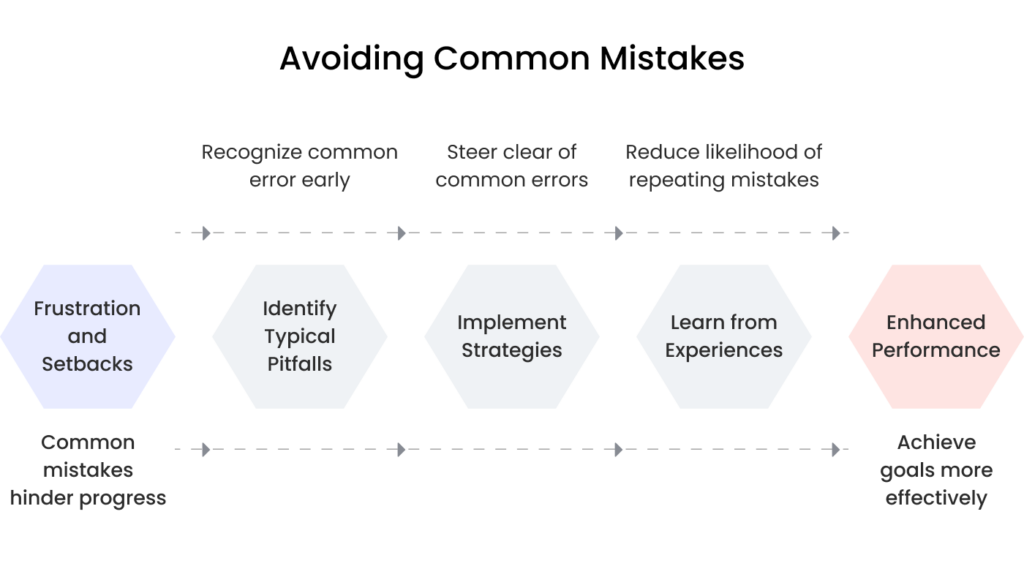
Learning from other Gujarat schools’ experiences can save you time, money, and frustration.
Mistake #1: Trying to Change Everything at Once
What happens: Schools attempt to digitize attendance, fees, communication, and academics simultaneously, overwhelming staff and creating chaos.
Reality check: Even tech-savvy schools take 6-12 months to fully implement comprehensive digital systems.
Better approach: Master one area completely before adding others. Success breeds confidence and makes subsequent changes easier.
Mistake #2: Ignoring Staff Comfort Levels
What happens: Schools choose sophisticated systems that intimidate staff, leading to resistance and poor adoption.
Reality check: The most advanced system is worthless if your team won’t use it consistently.
Better approach: Choose systems that match your staff’s current technology comfort level. You can always upgrade later as skills improve.
Mistake #3: Inadequate Training and Support
What happens: Schools provide minimal training, expecting staff to learn through trial and error, resulting in mistakes and frustration.
Reality check: Proper training is an investment, not an expense. Well-trained staff use systems effectively and become advocates for digital processes.
Better approach: Budget adequate time and resources for comprehensive training. Plan for ongoing support, not just initial instruction.
Mistake #4: Poor Parent Communication
What happens: Schools implement digital systems without properly explaining changes to parents, causing confusion and complaints.
Reality check: Parents need time to adapt to new communication methods and may need help learning to use digital tools.
Better approach: Communicate early and often. Provide clear instructions and continue offering familiar communication channels during the transition.
Mistake #5: No Backup Plans
What happens: When technology fails (and it sometimes will), schools without backup procedures face complete operational disruption.
Reality check: Digital systems are generally more reliable than paper, but you still need contingency plans.
Better approach: Maintain simple manual procedures for critical functions and ensure all staff know how to use them when needed.
Real Success Stories from Gujarat Schools

Here are specific examples of how traditional schools in Gujarat successfully completed their digital makeovers.
Case Study 1: Small Private School in Rajkot (200 students)
Challenge: Office staff spent 3 hours daily managing attendance records and answering parent queries about student presence.
Solution: Implemented simple attendance system with automatic SMS notifications to parents.
Implementation timeline: 4 weeks from decision to full operation
Results after 6 months:
- Attendance processing time reduced from 3 hours to 30 minutes daily
- Parent phone calls about attendance dropped by 80%
- Parents reported higher satisfaction with school communication
- Office staff had more time for student support activities
Key success factor: Started with just attendance, perfected that system, then gradually added fee management and communication features.
Case Study 2: Established School in Ahmedabad (600 students)
Challenge: Complex fee structure with multiple payment plans created confusion for parents and administrative burden for staff.
Solution: Digital fee management system with parent portal for balance checking and payment history.
Implementation timeline: 8 weeks including staff training and parent education
Results after 1 year:
- Fee-related queries reduced by 70%
- Payment collection improved by 15% due to better tracking
- Report generation time decreased from 2 days to 2 hours
- Accounting accuracy improved significantly
Key success factor: Extensive parent education program helped families learn to use the new system effectively.
Case Study 3: Traditional Gujarati Medium School (350 students)
Challenge: Language barriers made many digital solutions unsuitable for their Gujarati-speaking parent community.
Solution: Bilingual system with SMS communications in Gujarati and simple parent portal with local language support.
Implementation timeline: 6 weeks with extra time for language customization
Results after 8 months:
- 95% parent adoption rate for SMS notifications
- 60% parents actively using digital fee checking
- Improved parent-school relationship due to better communication
- Staff efficiency increased without losing personal touch
Key success factor: Chose vendor who provided full Gujarati language support and culturally appropriate implementation approach.
Budgeting for Your Digital Makeover

Understanding real costs helps you plan appropriately and avoid financial surprises.
Typical Investment for Gujarat Schools
Small Schools (Under 300 students):
- Software license: ₹60,000 – ₹1.2 lakhs annually
- Implementation and training: ₹20,000 – ₹40,000 (one-time)
- Hardware upgrades: ₹15,000 – ₹30,000 (if needed)
- Total first year: ₹95,000 – ₹1.9 lakhs
- Ongoing annual cost: ₹60,000 – ₹1.2 lakhs
Medium Schools (300-700 students):
- Software license: ₹1.2 – ₹2.5 lakhs annually
- Implementation and training: ₹40,000 – ₹75,000 (one-time)
- Hardware upgrades: ₹25,000 – ₹50,000 (if needed)
- Total first year: ₹1.85 – ₹3.25 lakhs
- Ongoing annual cost: ₹1.2 – ₹2.5 lakhs
Return on Investment Timeline
Most Gujarat schools see positive ROI within 8-15 months through:
- Reduced overtime costs: ₹30,000 – ₹60,000 annually
- Lower administrative expenses: ₹20,000 – ₹40,000 annually
- Improved fee collection: 5-15% improvement in on-time payments
- Staff productivity gains: Equivalent to 10-20 hours weekly of administrative time
- Parent satisfaction improvement: Better retention and referrals
Hidden Costs to Consider
- Staff time during transition: Temporary productivity decrease during learning phase
- Parent education efforts: Time spent helping parents adapt to new systems
- Data cleanup: Organizing existing records before digital migration
- Ongoing training: New staff members need system training
Measuring Success and Continuous Improvement
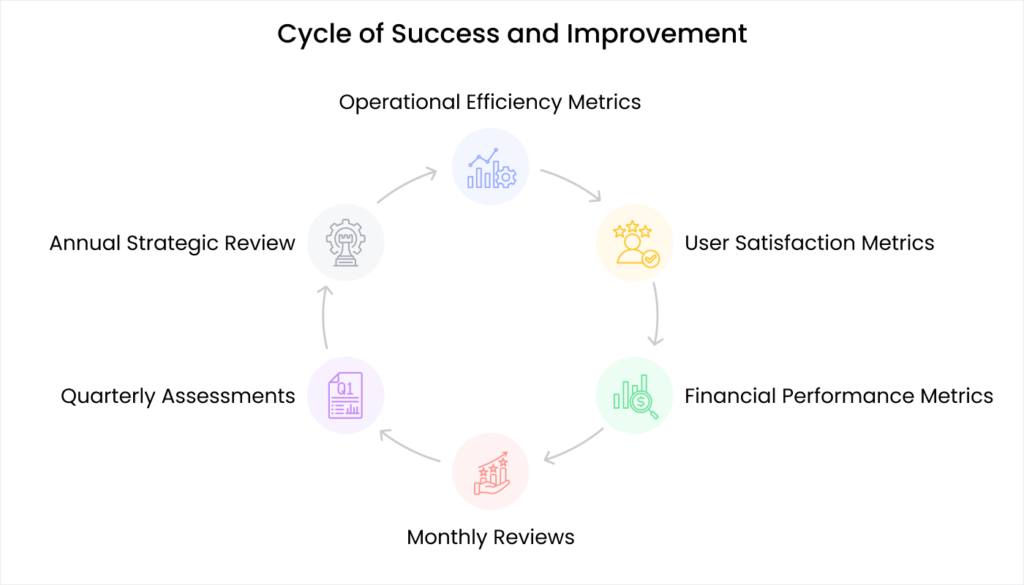
Digital implementation isn’t a one-time project – it’s an ongoing process of improvement and optimization.
Key Performance Indicators to Track
Operational Efficiency Metrics:
- Time spent on routine administrative tasks (daily/weekly measurement)
- Accuracy rates for attendance, fee records, and communications
- Response time for parent queries and requests
- Overtime hours during busy periods (exam time, fee collection, etc.)
User Satisfaction Metrics:
- Parent satisfaction surveys (quarterly)
- Staff feedback on system usability (monthly)
- Student feedback on any changes affecting their experience
- Community perception of school modernization efforts
Financial Performance Metrics:
- Administrative cost reduction compared to previous year
- Fee collection efficiency and timeliness improvements
- Reduction in error-related costs (re-work, corrections, complaints)
- Return on technology investment calculation
Continuous Improvement Process
Monthly Reviews:
- Staff feedback sessions on system performance
- Parent communication effectiveness assessment
- Technical issue identification and resolution
- Process optimization opportunities
Quarterly Assessments:
- Comprehensive performance metric analysis
- User satisfaction survey results
- ROI calculation updates
- Strategic planning for next phase improvements
Annual Strategic Review:
- Overall digital strategy effectiveness evaluation
- Technology upgrade and expansion planning
- Competitive positioning assessment
- Long-term vision alignment check
Your School’s Digital Future

The journey from traditional paper-based management to digital efficiency isn’t just about technology – it’s about creating better experiences for everyone in your school community.
What Success Really Looks Like
Successful digital implementation means:
For Teachers: More time focused on education, less time on administrative tasks
For Parents: Better communication, faster service, greater involvement in their child’s education
For Students: More attention from teachers, smoother school operations, better learning environment
For Administration: Efficient processes, accurate records, professional image, competitive advantages
The Competitive Reality
While you’re reading this guide, some schools in Gujarat are already implementing digital systems. Others are researching options. A few are still deciding whether to start.
Schools that act now gain first-mover advantages in their communities:
- Parents notice and appreciate operational improvements
- Teachers prefer working in efficiently-managed schools
- Word-of-mouth recommendations improve based on better service
- Professional image attracts quality families and staff
Schools that delay risk being perceived as outdated compared to more progressive competitors.
Taking Your First Step
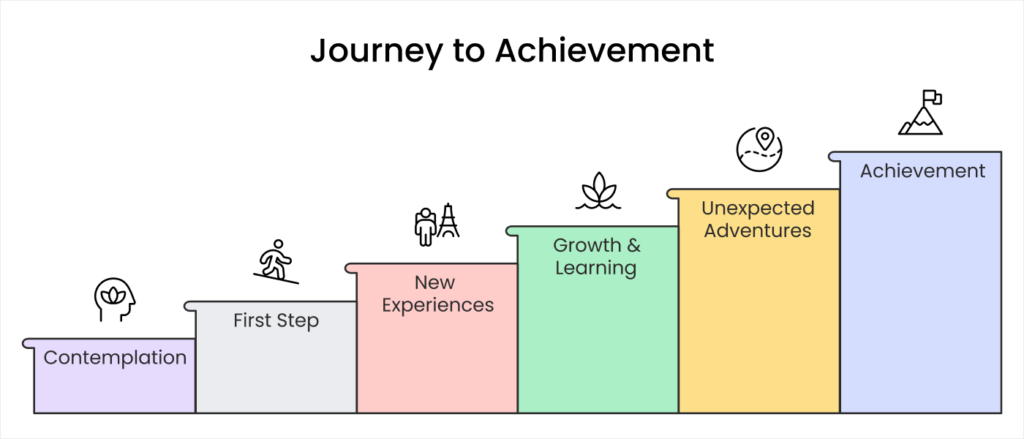
The hardest part of any digital makeover is getting started. But as you’ve seen from Gujarat schools’ success stories, the process is manageable when approached systematically.
What to Do Tis Week
Day 1-2: Complete the assessment questions from Step 1 of this guide
Day 3-4: Have conversations with key staff members about current challenges
Day 5-6: Visit or call 2-3 schools that have implemented digital systems
Day 7: Decide whether to proceed and set your implementation timeline
What to Do Next Month
If you decide to move forward:
- Complete detailed process mapping and goal setting
- Research and evaluate software options
- Begin staff preparation and team building
- Plan your technology infrastructure needs
- Set your implementation timeline and milestones
Getting Expert Support
Many Gujarat schools benefit from expert guidance during their digital transformation. Professional support can help you:
- Avoid common implementation mistakes
- Choose the right technology for your specific needs
- Plan realistic timelines and budgets
- Train staff effectively for maximum adoption
- Measure results and optimize performance
The investment in professional guidance often pays for itself through faster implementation, better results, and avoided mistakes.
Conclusion: Your School’s Bright Digital Future

Mrs. Patel’s 150-year-old school in Rajkot proves that tradition and technology aren’t opposites – they’re perfect partners when combined thoughtfully.
Her school still maintains the warm, community-focused atmosphere that families love. Students still receive individual attention. Teachers still care deeply about educational outcomes. Parents still feel connected to their children’s school experience.
The only difference is that everything works better now. Administrative tasks take less time. Communication is more effective. Records are more accurate. Parents are more satisfied. Teachers are less stressed.
Your school can achieve the same transformation. The technology exists. The process is proven. Other Gujarat schools have shown it’s completely achievable.
The question isn’t whether your school should embrace digital tools – it’s when you’ll take the first step toward a more efficient, effective, and satisfying operation for everyone in your school community.
Your school’s digital future starts with a single decision to begin. Everything else follows naturally when you approach the process systematically and thoughtfully.
Ready to Start Your School’s Digital Journey?
Don’t let another academic year pass with inefficient systems holding back your school’s potential.
Contact us today for a personalized consultation about digital transformation options specifically designed for Gujarat schools like yours.
We’ll help you assess your needs, understand your options, and create a step-by-step implementation plan that fits your school’s unique situation and budget.
Your journey to digital efficiency starts with a single conversation.


 4.9 5000 Total Reviews
Join Our Inner Circle for Special Perks


 Trusted by 50000 educational pioneers