The Smart Principal’s Guide to Running a Paperless School in 2025: What Actually Helps vs. What’s Just for Show
 October 10, 2025

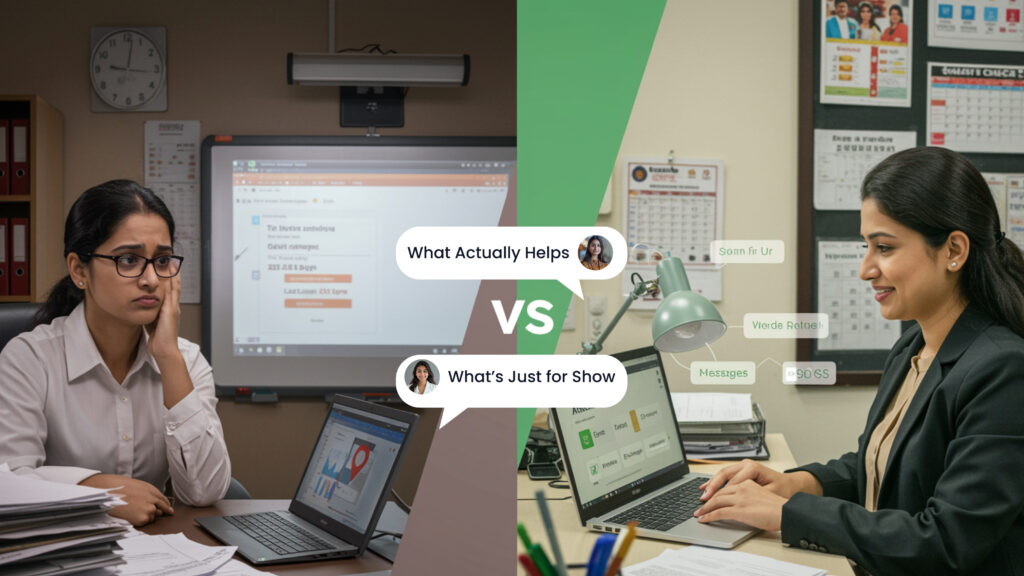
Table of Contents
Stop wasting money on impressive-looking school technology that nobody uses. Brutally honest guide for Gujarat principals on choosing paperless solutions that actually work in real Indian schools—not just fancy demos. Learn the 5 questions that expose show-off technology and discover what 67% of schools waste their software budget on.
Last month, I walked into a principal’s office in Rajkot. On her desk sat a brand new iPad that still had the plastic wrap on it. Behind her, a ₹4 lakh interactive whiteboard gathered dust. And on her computer screen? An expensive school management software dashboard showing zero logins for the past week.
“We spent ₹8 lakhs on all this last year,” she said quietly. “The sales guy made it look so impressive. But honestly? Nobody uses any of it. My teachers still prefer their paper registers.”
Her voice dropped to almost a whisper. “I can’t tell the school board I wasted their money.”
She’s not alone. After talking to dozens of Gujarat school principals, I’ve discovered a dirty secret about going paperless: Most schools are buying technology that looks great in presentations but fails miserably in daily use.
Here’s what nobody tells you about paperless schools – and what you actually need to know before spending another rupee on technology.
The Expensive Lie About Paperless Schools

Walk into any education technology conference, and smart principal guide you will show you mind-blowing demos. Schools with fancy dashboards, teachers using tablets, students learning on interactive boards, parents getting notifications in seventeen different ways.
It all looks incredible. Until you try using it on Tuesday morning when half your staff calls in sick, the internet is slow because of rain, and you have 200 parents waiting for admission forms.
- The Research Nobody Shares
A recent study found that schools waste 67% of the software licenses they purchase. That’s not a typo. Two-thirds of paid technology sits unused.
Some schools? They’re wasting 90% of what they buy.
Think about that. If your school spends ₹3 lakhs on software, you’re potentially throwing ₹2 lakhs directly into the trash.
The global waste on unused classroom technology? Over ₹26,000 crores annually.
Why does this happen? Because schools buy what impresses during demos, not what actually helps during real work.
What Makes Technology “Show-Off” vs. “Useful”
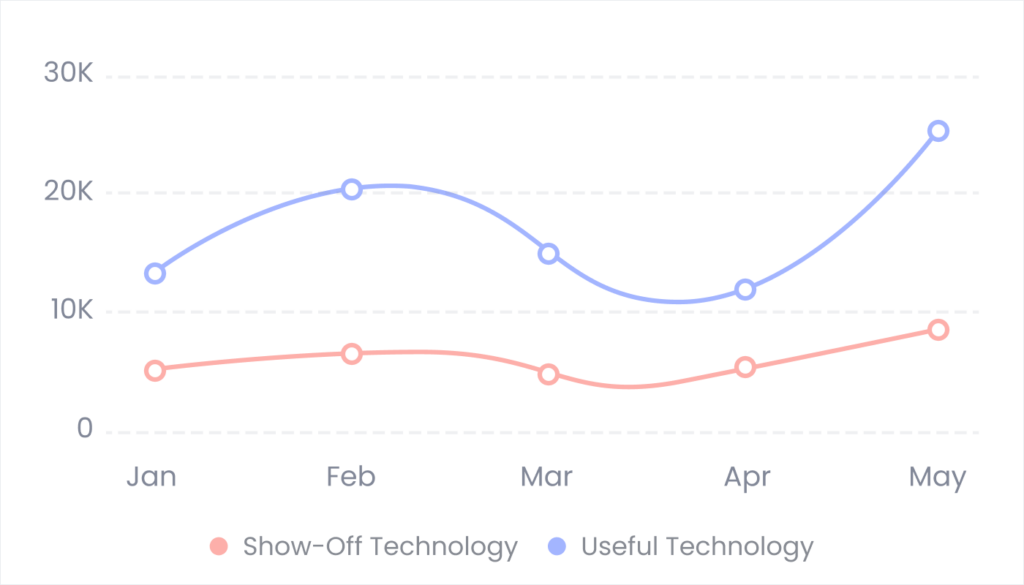
Here’s how to tell the difference between technology that actually helps and technology that just makes you look modern:
Show-Off Technology: Looks Great, Works Poorly
- Feature overload: Software with 47 different modules and dashboards for everything imaginable. Sounds impressive until your 55-year-old office manager needs to find simple attendance records and has to navigate through seven screens.
Real example from Ahmedabad: A school bought software with modules for everything from cafeteria management to bus tracking to library systems to sports scheduling. After one year, they used exactly three modules – attendance, fees, and basic communication. The rest? Never opened.
- Fancy hardware nobody requested: Interactive whiteboards that require special training, tablets for every student that teachers don’t know how to use, biometric systems that break during monsoon season.
A Surat school spent ₹6 lakhs on interactive whiteboards. After the initial excitement wore off, teachers went back to regular whiteboards because the “smart” ones took 10 minutes to start up every morning and crashed whenever internet slowed down.
- “Revolutionary” new approaches: Software that forces you to completely change how your school operates. The vendor calls it “innovation.” Your staff calls it “unnecessary complication.”
Reality check: If the technology requires a complete overhaul of processes that were working fine, it’s probably not solving your actual problems.
Useful Technology: Simple, Practical, Actually Used
- Solves one problem really well: Instead of doing 47 things poorly, it does 5 things excellently – the exact 5 things you need most.
Example: A Rajkot school chose simple software that only handled attendance and parent notifications. Within two weeks, it cut their morning administrative time by 45 minutes daily. Parents loved getting instant updates. Teachers found it easier than paper registers.
- Requires minimal training: Your staff should be able to use it within a day or two, not after weeks of training courses.
The test: If your newest office staff member can’t figure out basic operations within 30 minutes, the software is too complicated.
- Works with your current setup: Instead of requiring new computers, special internet connections, or complete process overhauls, it fits into how your school already operates.
- Fails gracefully: When internet cuts out (because this is India), you can still access basic functions offline. When the system has problems, you can quickly switch to backup methods without chaos.
The Five Questions That Expose Show-Off Technology
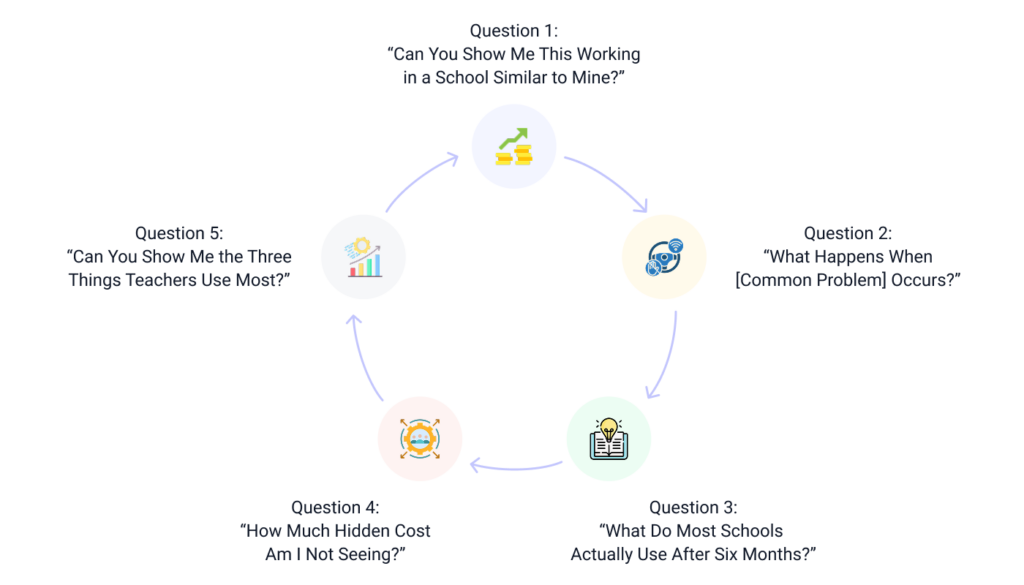
Before buying any paperless solution, ask these brutally honest questions. Digital school transformation’s vendors hate them, but they’ll save you lakhs.
Question 1: “Can You Show Me This Working in a School Similar to Mine?”
Not a demo. Not a presentation. An actual school in Gujarat that’s been using this daily for at least six months.
Red flags:
- Vendor only shows demos, never real school visits
- “Our best implementations are in international schools” (translation: this won’t work in typical Indian schools)
- Reference schools are 3x larger or smaller than yours
- Schools using it are in metro cities with perfect internet
Good signs:
- They immediately offer contact details for 3-4 similar schools
- Happy to arrange unannounced visits
- Reference schools sound like your school’s situation
Question 2: “What Happens When [Common Problem] Occurs?”
Test with real problems Gujarat schools face:
- “What happens when power goes out during fee collection?”
- “What if internet cuts during attendance time?”
- “What if my oldest staff member who barely uses email needs to use this?”
- “What happens during monsoon when connectivity is terrible?”
Watch how vendors respond. Confident vendors have specific answers. Worried vendors change the subject or claim problems won’t happen (they will).
Question 3: “What Do Most Schools Actually Use After Six Months?”
This reveals the truth. The vendor might have sold 50 features, but real schools probably only use 5-7 regularly.
If their answer is “everything!” – they’re lying. Nobody uses every feature of any software.
Good vendors honestly tell you, “Most schools use these core features daily and occasionally use these advanced features.” That’s realistic.
Question 4: “How Much Hidden Cost Am I Not Seeing?”
The software might cost ₹1.5 lakhs annually, but what about:
- Training costs
- Hardware upgrades needed
- Internet speed improvements required
- Technical support costs
- Data migration expenses
- Customization charges
A school in Baroda learned this the hard way. ₹2 lakh software quote turned into ₹5 lakhs actual first-year cost after all hidden expenses appeared.
Question 5: “Can You Show Me the Three Things Teachers Use Most?”
If the vendor starts with complex dashboards and reports, warning bells should ring. Teachers need simple daily tools – attendance, homework tracking, basic communication.
Good software puts the most-used features front and center, not buried under menus.
The Practical Paperless Setup That Actually Works
After studying schools across Gujarat that successfully went paperless without wasting money, here’s what actually works:
Start With the Most Painful Problems Only
Don’t try to digitize everything. Pick your single biggest daily headache and solve only that first.
Common starting points that work:
- Daily attendance + parent notifications – Usually saves 30-60 minutes daily, parents love it
- Fee tracking and inquiries – Cuts phone calls by 70%, reduces errors significantly
- Basic parent communication – Replaces WhatsApp madness with organized system
Master one area completely. Only then add the next feature.
A 400-student school in Rajkot went paperless over 18 months:
- Month 1-3: Just attendance and parent SMS
- Month 4-7: Added fee management after attendance became smooth
- Month 8-12: Added homework tracking once staff was comfortable
- Month 13-18: Added exam results and report cards
Result? Everything actually works because they didn’t rush.
Choose Software Your Least Tech-Savvy Staff Member Can Use
Seriously. Give the login to your oldest, least computer-comfortable staff member. If they can do basic tasks within 30 minutes, the software passes this test.
If they’re confused or frustrated, the software is too complicated. Period.
Demand Proper Training, Not Just Installation
Installation without training is like buying a car but never learning to drive it. You have an expensive thing you can’t use.
Minimum training requirements:
- Full day hands-on training for all staff who’ll use it daily
- Follow-up session after two weeks to address problems
- Quick reference guides in Hindi/Gujarati
- On-call support in local languages for first month
Schools that skip training end up abandoning expensive software within months.
Insist on Offline Capability
Internet in India isn’t reliable enough to depend on completely cloud-based systems. Your software must work offline for basic functions.
Essential offline capabilities:
- Mark attendance even without internet (syncs later)
- Access yesterday’s records and basic student information
- Print receipts for fee payments
- View today’s schedule and homework
Plan for Monsoon Season Reality
If the technology only works in perfect conditions, it won’t work in Gujarat schools.
Monsoon-proof checklist:
- Paper backups for critical daily tasks
- Works on basic phones, not just smartphones
- Doesn’t require perfect internet speeds
- Data backs up automatically even with slow connections
Real Cost of Going Paperless (The Honest Numbers)

Vendors love showing low monthly costs. Let’s look at real annual expenses Gujarat schools actually face:
Year One (Highest Cost)
Small school example:
- Software: ₹80,000
- Training: ₹15,000
- Minor hardware upgrades: ₹20,000
- Data migration help: ₹10,000
- Total: ₹1.25 lakhs
Medium school example:
- Software: ₹1.8 lakhs
- Training: ₹30,000
- Hardware/internet upgrades: ₹40,000
- Implementation support: ₹25,000
- Total: ₹2.75 lakhs
Year Two Onwards (Recurring)
Costs drop significantly after first year:
- Software renewal: 80% of first year cost
- Minimal training (only new staff)
- Minimal hardware costs
ROI Timeline: Most Gujarat schools see positive ROI within 12-15 months through:
- Reduced overtime during busy periods
- Fewer administrative errors
- Better fee collection
- Less paper/printing costs
- Higher parent satisfaction (better retention)
The Mistakes Schools Make (And How to Avoid Them)
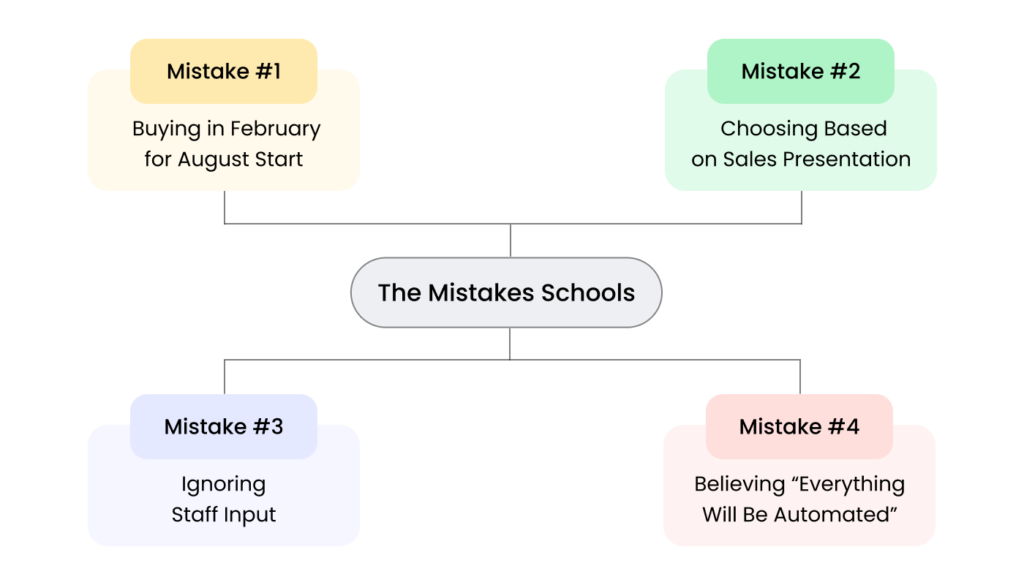
Mistake #1: Buying in February for August Start
Schools decide they want to go paperless, buy software in February, then forget about it until new academic year starts.
Result? Panic implementation, no proper training, staff resistance, failure.
- Better approach: Buy in March-April, train thoroughly in May-June, test run in July with last year’s students, confident launch in August.
Mistake #2: Choosing Based on Sales Presentation
Vendors are professional presenters. Everything looks amazing in their slides.
Reality check: Software that needs 45-minute presentation to explain basics is probably too complicated.
- Better approach: Insist on trial period with your actual school data. If vendor resists, that’s a red flag.
Mistake #3: Ignoring Staff Input
Principal decides, buys, announces. Teachers hate it, sabotage through passive resistance.
Example: Rajkot school bought tablet-based attendance system. Teachers claimed tablets “didn’t work reliably” and continued paper registers. After six months, expensive tablets sat unused.
Real issue? Teachers were never asked, never trained properly, never understood benefits.
- Better approach: Include teachers in decision. Get their buy-in before buying. Train thoroughly. Listen to their concerns.
Mistake #4: Believing “Everything Will Be Automated”
Vendors promise complete automation. Reality is much messier.
You’ll still need:
- Staff to manage system
- Someone monitoring for errors
- Backup procedures for failures
- Training for new staff
- Updates and troubleshooting
- Better approach: Plan for 60-70% automation of routine tasks, not 100%. That’s realistic.
Technology You Probably Don’t Need (Despite What Vendors Say)
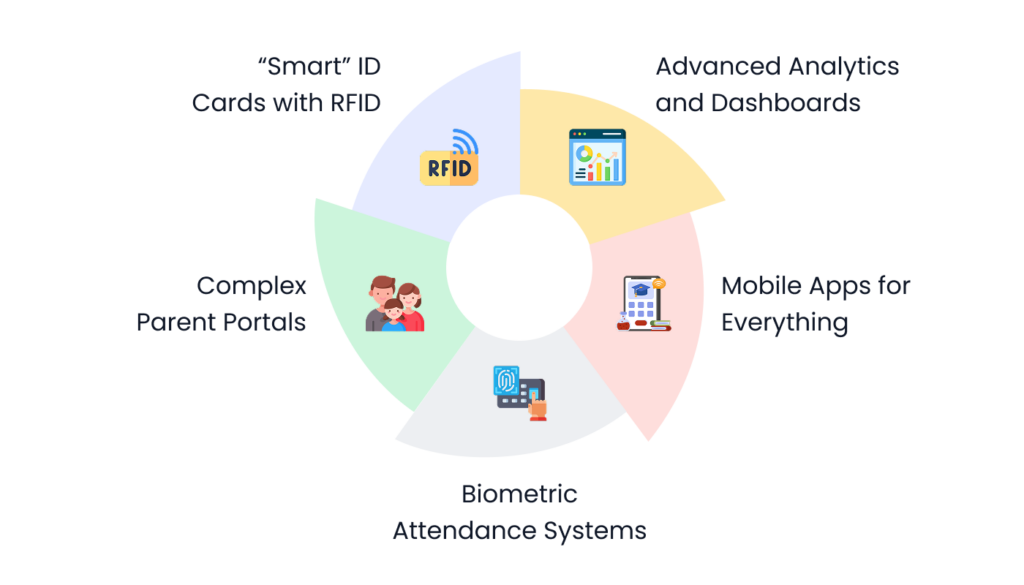
Let’s be honest about features that sound impressive but rarely get used:
Advanced Analytics and Dashboards
Unless you’re a 1000+ student school with dedicated data analyst, you probably won’t use complex analytics.
Basic reports? Yes, those are useful. But predictive analytics, complex graphs, trend projections? Most schools never look at them after initial excitement.
Mobile Apps for Everything
Separate apps for teachers, students, parents, management – sounds modern. Reality? More apps mean more confusion and lower adoption.
Better: One simple parent app, one simple teacher portal (works in browser), no separate apps needed.
Biometric Attendance Systems
Sounds high-tech. Problems? Fingerprint readers fail during monsoon. Students with rough hands from playing don’t register. Systems break frequently.
Better: Simple card-based or app-based attendance. Easier, more reliable, cheaper.
Complex Parent Portals
Portals with 15 different sections showing everything from cafeteria balance to library books borrowed to detailed academic progress with color-coded graphs.
Reality? Parents want four things:
- Is my child present today?
- What’s the homework?
- When are exams?
- What are the fee dues?
Give them simple access to these four. Skip the rest.
“Smart” ID Cards with RFID
Every student gets ID card that automatically records attendance, library visits, cafeteria purchases, bus boarding.
Sounds amazing. Reality? Cards get lost, damaged, forgotten. Readers break. System becomes more trouble than it’s worth for smaller schools.
Makes sense for 1000+ student schools. Waste of money for smaller institutions.
The Questions Parents Actually Ask (Focus Here)
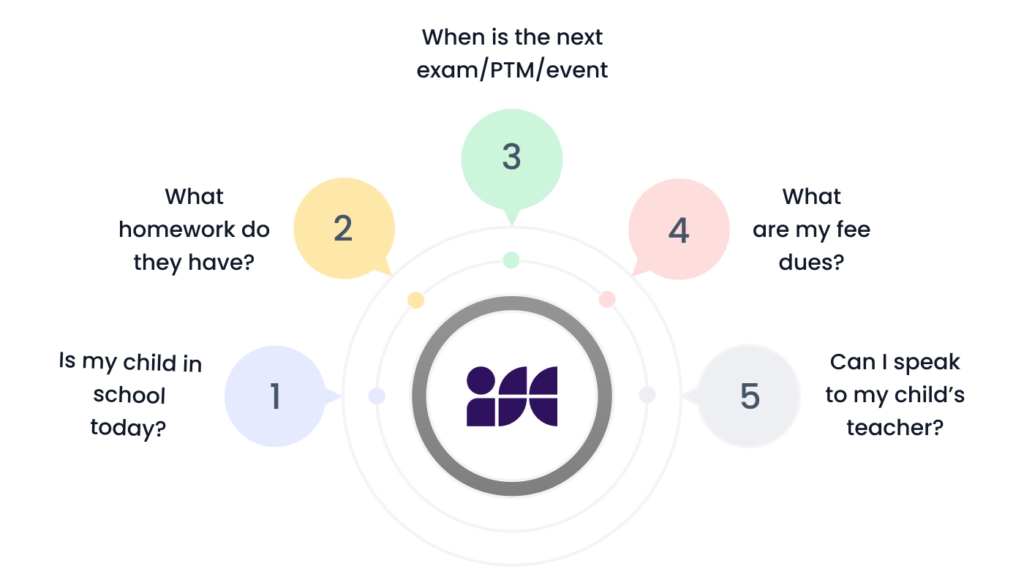
After analyzing thousands of parent queries Gujarat schools receive, 80% fall into five categories. Your paperless system should handle these effortlessly:
1. “Is my child in school today?”
Parents want instant confirmation that child reached school safely.
Simple solution: Automatic SMS when attendance marked. Parents get message by 10 AM daily.
2. “What homework do they have?”
Parents helping with homework need to know assignments.
Simple solution: Homework posted daily, accessible via SMS query or simple app.
3. “When is the next exam/PTM/event?”
Parents planning their schedules need advance notice.
Simple solution: Calendar shared via SMS/app with automatic reminders 3 days and 1 day before.
4. “What are my fee dues?”
Most frequent office phone call.
Simple solution: Balance checking via SMS or app, automatic reminders for upcoming due dates.
5. “Can I speak to my child’s teacher?”
Parents wanting updates on specific concerns.
Simple solution: Teacher contact option with 24-hour response commitment.
Technology that handles these five things well is infinitely more useful than complex systems trying to do fifty things poorly.
The Real Benefit
The best thing about going paperless isn’t the technology itself. It’s freeing your teachers and staff from mindless administrative tasks so they can focus on actually educating students.
When your teachers spend 30 minutes less daily on attendance paperwork, they have 30 more minutes for lesson planning, student help, or simply being less stressed.
That’s the real win.
Your Action Plan (What to Do This Week)

Ready to go paperless the right way? Start here:
Monday-Tuesday: Identify Your Pain Points
Ask your staff:
- What daily task takes longest that shouldn’t?
- What do parents ask about most that we should have instant answers for?
- What manual processes cause most mistakes?
Write down top 3 pain points. Those are your priorities.
Wednesday-Thursday: Research Solutions
Look for software that solves your specific pain points, not software with most features.
Talk to 3-4 schools similar to yours that went paperless. Ask:
- What do you actually use daily?
- What features sounded great but you never use?
- What would you choose differently if starting over?
Friday: Set Realistic Budget
Calculate:
- How much time does current manual process waste? (hours × salary rate)
- What’s realistic technology budget for your school size?
- Can you afford to waste money on wrong choice?
Next Week: Start Small
Choose ONE area to digitize. Just one.
Get it working perfectly before adding more.
The Bottom Line

Going paperless can genuinely help your school. But only if you choose technology that actually solves real problems instead of technology that just looks impressive.
The smart principal’s approach:
- Start with your biggest daily pain point
- Choose simple solutions your least tech-savvy staff can use
- Train properly, don’t just install
- Test thoroughly before full launch
- Add features gradually, not all at once
Skip the show-off technology. Invest in useful tools. Your staff, students, and parents will thank you.
And your school board will thank you when the technology actually gets used instead of gathering dust like that iPad on the principal’s desk.
Ready to go paperless the smart way?
We help Gujarat schools choose practical technology that actually works in real Indian school conditions – not just impressive demos. From assessment to implementation to training, we focus on solutions your staff will actually use.
Contact us for honest consultation about paperless options that fit your school’s specific needs and budget. No sales pressure, just straight answers about what will and won’t work for schools like yours.


 4.9 5000 Total Reviews
Join Our Inner Circle for Special Perks


 Trusted by 50000 educational pioneers